A rhythm idea can be clear in your head and still be surprisingly difficult to send to another person.
You can tap it on a table, record a voice message, write “kick on one and three,” or send a screenshot of a step sequencer. Each method communicates part of the idea, but none of them gives the other person an easy way to hear it, slow it down, or change it.
A playable drum pattern solves that problem.
With the free SolAudioLab Drum Machine, you can build a multi-bar rhythm in your browser and copy a share link. The person who opens the link can hear the pattern immediately and continue working with it in the same editor. No DAW project, plug-in, or special file format is required.
In short: create the groove, copy the link, and let the next person play and edit the actual pattern instead of trying to reconstruct it from an explanation.
Why drum patterns are difficult to communicate
Tempo is only one part of a groove. Two patterns at the same BPM can feel completely different because of kick placement, hi-hat movement, snare accents, swing, rests, and the way several bars develop.
Written descriptions often become too vague:
- “Play a simple rock beat, but make the second bar heavier.”
- “Leave some space before the chorus.”
- “Try a half-time feeling with a busier hi-hat.”
Those directions may make sense during a rehearsal, but they are not precise enough when people are working separately. An audio recording is clearer, but the listener cannot easily mute an instrument, move one step, or test another tempo.
A shared editable pattern sits between a written note and a full DAW session. It is quick enough for a rough idea and concrete enough for someone else to understand.
Build the rhythm before worrying about production
The SolAudioLab Drum Machine is designed as a sketchpad rather than a complete drum-production environment.
Start a new pattern and choose its basic structure:
- Pattern name
- BPM
- Time signature
- Steps per bar
- One, two, four, or eight bars
You can begin from an empty grid or load a preset such as a basic rock, funk, or reggae pattern. The editor works one bar at a time, which keeps longer rhythms manageable on a laptop or phone. Copy and paste a bar, duplicate it across the pattern, and then change only the parts that need variation.
The 12 synthetic drum and percussion tracks include kick, several hi-hat articulations, snare sounds, ride, bongos, and simple timing sounds. They are not intended to imitate a finished acoustic drum recording. Their job is to make the placement and movement of the rhythm easy to hear.
That limitation can be useful. When the sounds are simple, attention stays on the groove rather than sample selection, processing, or mixing.
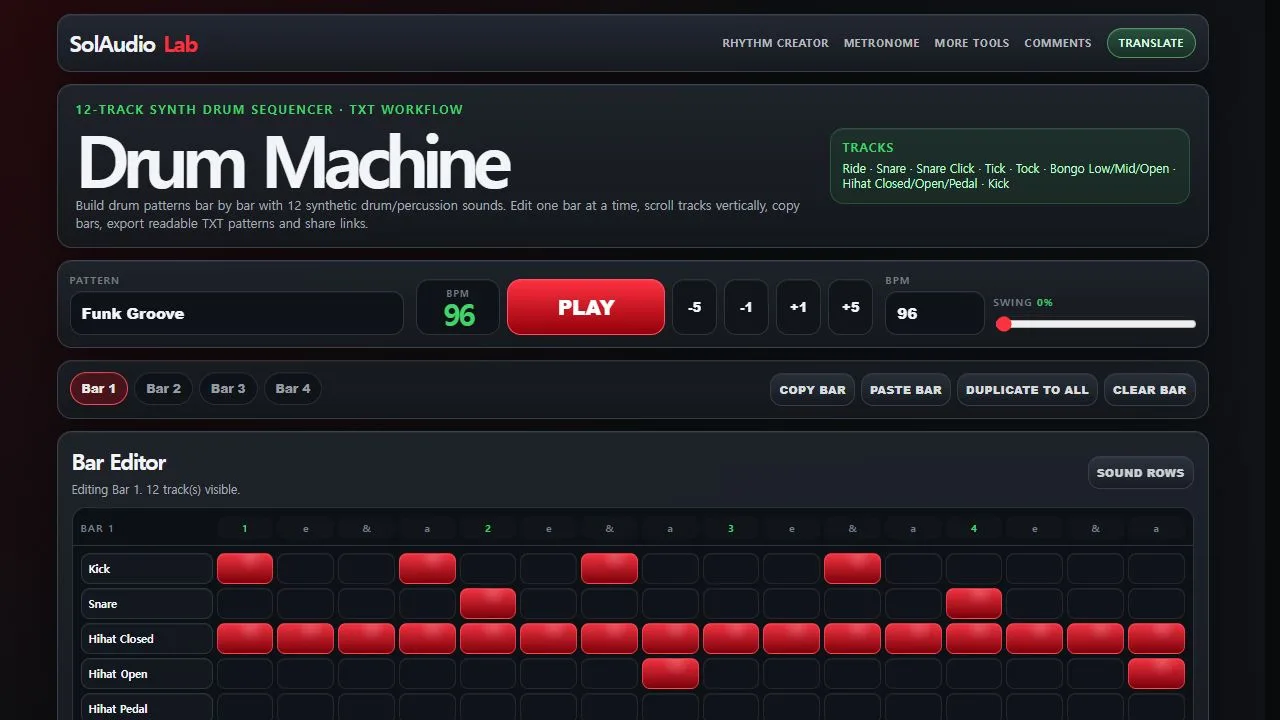
Build one bar at a time, then copy and modify bars to create a longer groove.
Share a playable pattern instead of a screenshot
After building the rhythm, open Save / TXT / Share and choose Copy Share Link.
The copied URL carries the pattern into the browser editor. When a bandmate, student, or collaborator opens it, the useful part is already there: the rhythm itself. They can press Play, listen at the intended BPM, and inspect the steps bar by bar.
Because the shared pattern opens in the editor, it is also a practical starting point for a variation. The recipient can change the BPM, move hits, simplify a busy bar, add a fill, or reshape the groove for another section of the song.
This is effectively a “copy and edit” workflow without exchanging a DAW session. The original link remains the reference, while the edited pattern can be saved or shared again as a new version.
For a quick collaboration, the process is simply:
- Create the pattern.
- Copy the share link.
- Send it to another person.
- Let them play and edit the rhythm.
- Share the revised version back.
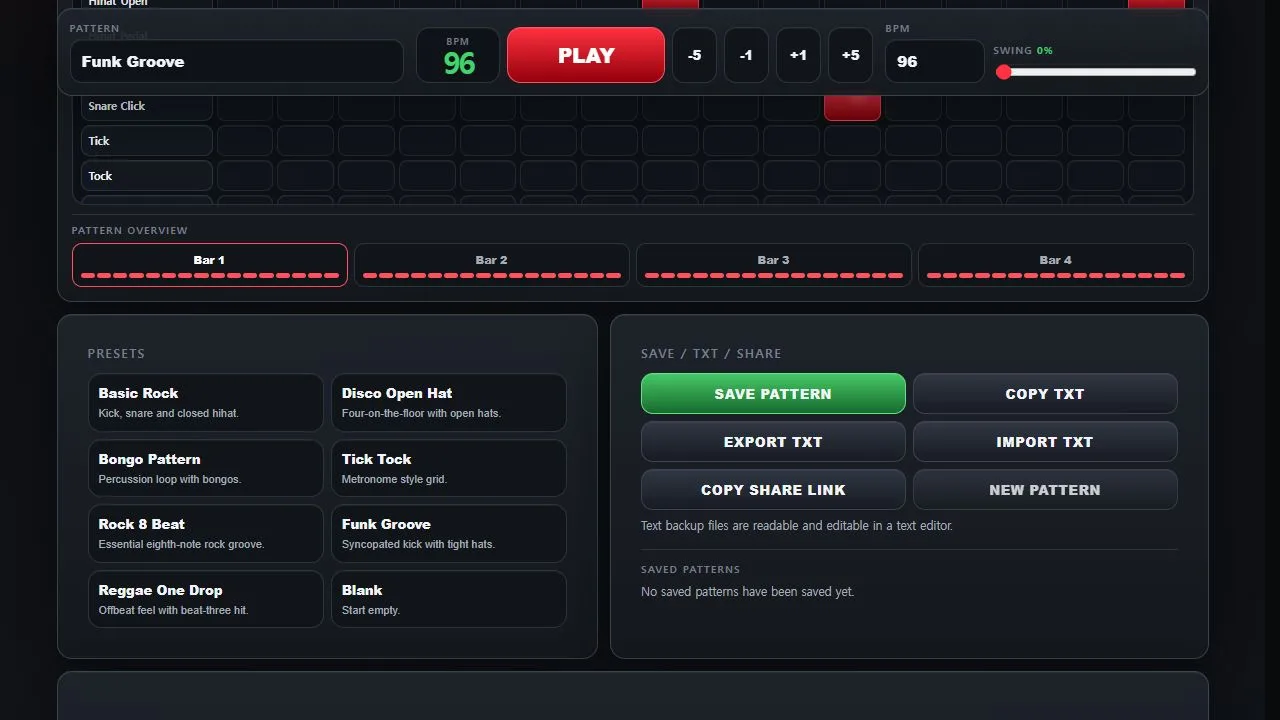
A share link lets another person open the playable pattern in the same browser editor.
A readable TXT file is useful for longer-term backup
Links are convenient for communication, but a pattern may also need to survive beyond a chat thread or browser session.
The Drum Machine can export its pattern as a readable TXT file. The file can be stored with rehearsal notes, lyrics, charts, or other song materials. It can also be opened in a text editor and imported into the Drum Machine later.
This is deliberately different from a large project file that only one application understands. The TXT workflow is lightweight, easy to archive, and useful when you want a simple record of the rhythmic idea rather than a complete production.
Browser Save is helpful for patterns you use repeatedly on the same device. TXT export is the safer choice when a pattern matters enough to keep or move to another device.
Practical ways to use shared drum patterns
Before band rehearsal
Send a basic arrangement pattern before everyone meets. The drummer does not have to copy it literally. It gives the band a common starting point for the verse, chorus, break, or ending.
Between a songwriter and a drummer
A songwriter can show the intended pulse without programming a polished drum track. The drummer can return a simpler, heavier, or more syncopated version as another link.
For rhythm lessons
A teacher can send a short pattern at a comfortable BPM. The student can play it, reduce the tempo, inspect the grid, and create a variation as an exercise.
When explaining an arrangement remotely
Instead of writing “the fill starts late in bar four,” place it in bar four and send the playable example. The pattern becomes the explanation.
As a practice loop
Create only the rhythm needed for today’s practice. A short repeating groove can be more useful than searching for a full backing track that happens to match the exercise.
What this tool is—and what it is not
The Drum Machine is useful when speed and clarity matter more than finished sound.
It is not a replacement for a drummer, a detailed drum instrument, or a DAW. It does not attempt to provide multitrack audio production, realistic microphone channels, or a complete song arrangement environment.
Use it to answer a smaller and more practical question:
“Can I show someone this rhythm in a form they can hear and change right now?”
For that job, a browser pattern is often enough.
Try it with one small idea
Open the SolAudioLab Drum Machine, load a preset or create a new pattern, and change one bar so it becomes your own. Then copy the share link and open it in another browser tab.
If the pattern plays and remains editable, you already have a simple way to exchange rhythm ideas without preparing a DAW session.
The best first pattern does not need to be impressive. It only needs to communicate something that would have been harder to explain in a message.
FAQ
Can I create a drum pattern without installing a DAW?
Yes. The SolAudioLab Drum Machine runs in a web browser and provides a step-based editor for building and playing drum patterns.
Can I share the pattern with someone else?
Yes. Copy Share Link creates a URL that can be sent through email, chat, a document, or a rehearsal note.
Can the person who receives the link edit the rhythm?
Yes. The pattern opens in the browser editor, where it can be played and modified. The edited version can then be saved or shared again.
Can I back up a pattern as a file?
Yes. You can export a readable TXT pattern and import it again later.
Does the Drum Machine make finished drum tracks?
No. It is primarily a rhythm sketching, practice, and communication tool. Use a DAW or dedicated drum instrument when you need realistic sounds and production control.