Is the vocal still clear?
Check how a different tonal balance changes the space around the voice.
SolAudioLab presents
Experience the tonal character of other headphones through the ones you already know.
Choose your current headphones, choose a target, and compare inside your DAW without changing your listening position or workflow.
Monitoring reference, not a claim of exact physical headphone reproduction.
A familiar reference changes the question.
Instead of asking what a review means by brighter, darker, fuller, or leaner, use your own headphones as the reference. Virtual Headphones applies a practical response correction so you can hear the direction and scale of the tonal change directly.
Use it while mixing, checking translation, or exploring a headphone you are curious about before you have a chance to hear it in person.
Built to stay in the monitoring chain
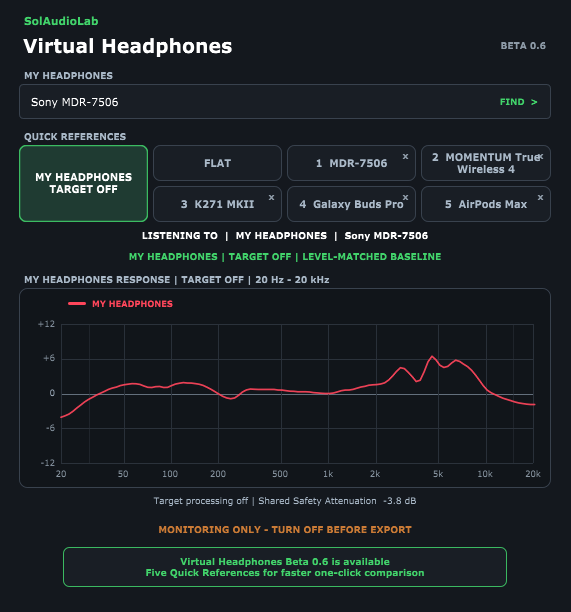
Keep the plug-in on your monitoring bus and switch between the selected target and your own headphones from one fixed control. The graph shows the original headphone response, the target response, and the correction filters that are actually being applied.
Select the headphones you are physically wearing.
Choose another model, a selected consumer device, or neutral correction.
Toggle at the same screen position so comparison stays fast and repeatable.
A growing reference library
Search by manufacturer or model name. Recently used source and target models are stored separately on your computer so repeated checks get faster.
Mix translation without the gear pile
Use the plug-in to ask practical questions while you work.
Check how a different tonal balance changes the space around the voice.
Compare how bass weight and upper-bass balance shift on another reference.
Use a different target to expose choices that may feel safe on only one headphone.
Monitoring only
Virtual Headphones is a monitoring plug-in. It attempts to bypass its audio processing during an offline export, but not every DAW reports export state in the same way. Disable the plug-in manually before the final Export or Bounce.
Fit, ear-pad condition, ear shape, seal, source measurements, ANC, and device DSP can change the real result. Treat the comparison as a practical listening reference rather than an exact reproduction of a physical unit.
Choose your plug-in format
Choose the format your DAW loads. The macOS builds are Universal binaries for Apple Silicon and Intel Macs, signed with a Developer ID certificate, and notarized by Apple.
For 64-bit Windows DAWs that support VST3 plug-ins.
WINDOWS VST3
Quit the DAW. Copy the included SolAudioLab folder into the common VST3 folder, then start the DAW and rescan.
C:\Program Files\Common Files\VST3\SolAudioLab\Virtual Headphones.vst3
For macOS 11 or later DAWs that support VST3. Logic Pro does not load VST3.
macOS VST3
Quit the DAW. Copy Virtual Headphones.vst3 directly into the system VST3 folder, then reopen the DAW and rescan if needed.
/Library/Audio/Plug-Ins/VST3/Virtual Headphones.vst3
For Logic Pro, GarageBand, and other 64-bit Audio Unit hosts on macOS 11 or later.
LOGIC AU
Quit Logic Pro. Copy Virtual Headphones.component directly into the Components folder, then reopen Logic and let it validate the Audio Unit.
/Library/Audio/Plug-Ins/Components/Virtual Headphones.component
Each download includes English and Korean installation notes, model reference information, and open-source notices.
No DAW? No installation?
The original Virtual Headphones web tool lets you compare a much larger headphone database with your own audio file. Use the plug-in while you work, and use the web tool when you want to explore.
Virtual Headphones is part of SolAudioLab.
SolAudioLab builds focused tools for listening, mixing, recording, live sound, and acoustic work. Each tool is designed to solve one real problem quickly, without turning the browser into another complicated workstation.
Measure loudness, peaks, dynamics, stereo balance, and technical playback characteristics.
Find useful listening references and understand what to listen for in a mix.
Plan rooms, treatment, speakers, and listening positions in a practical 3D workspace.
Keep your reference. Change the perspective.
Put another listening reference one click away inside your DAW.