
Streaming platforms can turn a loud master down. They cannot restore the transient punch, musical contrast, or movement that was removed to make it loud.
That is the central problem with chasing loudness for streaming. A heavily limited master may win an instant volume comparison before normalization. Once playback gain is matched, that advantage can shrink or disappear, while the flattened peaks remain.
Apple makes this point directly in its Apple Digital Masters technical brief: loud masters may be played back at a lower level by Sound Check and can end up sounding weaker. The same document explains that raising overall level while limiting peaks reduces dynamic range.
This does not mean every master should be quiet, or that more dynamic range is always better. A dense rock, metal, hip-hop, or electronic master may be exactly right for the music. The useful question is different:
After playback loudness is matched, does the master still keep the punch and movement the music needs?
What loudness normalization actually changes
Songs arrive at streaming services with very different loudness levels. Normalization reduces abrupt level jumps so listeners do not need to reach for the volume control every time a new track starts.
Spotify says its Normal setting adjusts tracks toward -14 LUFS. A louder master receives negative playback gain, while a quieter master may receive positive gain when sufficient headroom is available. Spotify also states that this adjustment happens during playback rather than rewriting the uploaded audio file. Playback can still vary with the listener's setting, device, and player. See Spotify's official loudness normalization guide.
Apple Sound Check follows the same broad idea. It measures a track and uses loudness information to raise or lower playback level, including album-aware behavior when track-to-track level relationships matter. See the Apple Digital Masters technical brief.
The important distinction is that playback normalization is a gain change. It does not reopen compressed transients or recreate level differences that were removed during mastering.
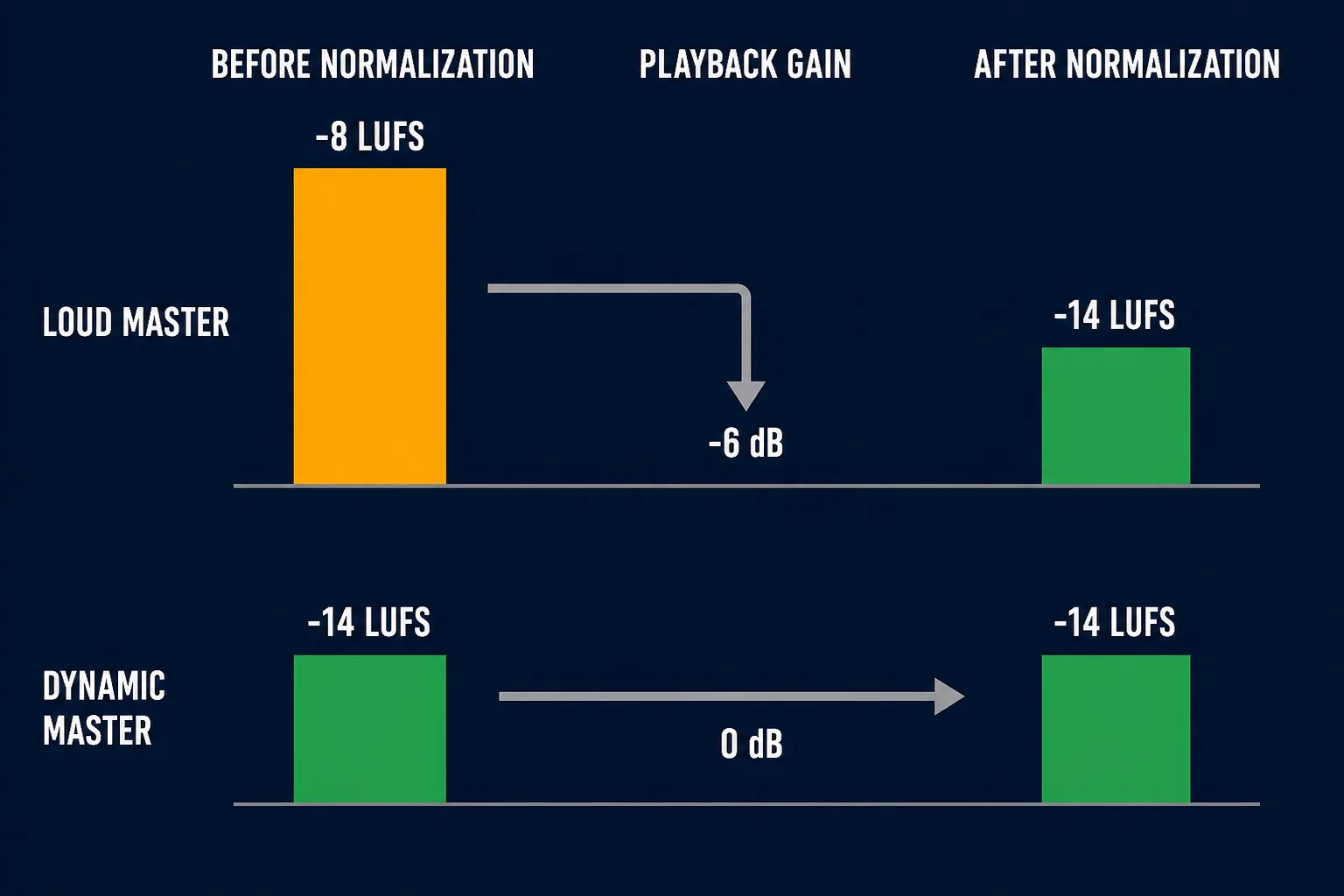
A louder master may receive more negative playback gain. Once normalized, its original level advantage can disappear.
When the loudness advantage disappears
Consider two simplified masters:
- Master A: -8 LUFS with heavy compression and limiting
- Master B: -14 LUFS with more transient contrast preserved
In a playback environment normalized to -14 LUFS, Master A could be reduced by about 6 dB. Master B could play with little or no gain change. Their average playback loudness would then be similar.
But their sound would not become identical.
If Master A lost kick attack, snare impact, vocal movement, and verse-to-chorus contrast on the way to -8 LUFS, turning it down does not bring those features back. Master B may retain clearer short-term peaks and movement at the matched playback level.
This is an illustration, not a universal mastering recipe. The exact result depends on the audio, the normalization system, the listening mode, and the musical intention.
What real analyzer views can show
The following SolAudioLab Audio Analyzer captures show two different waveform and loudness patterns.
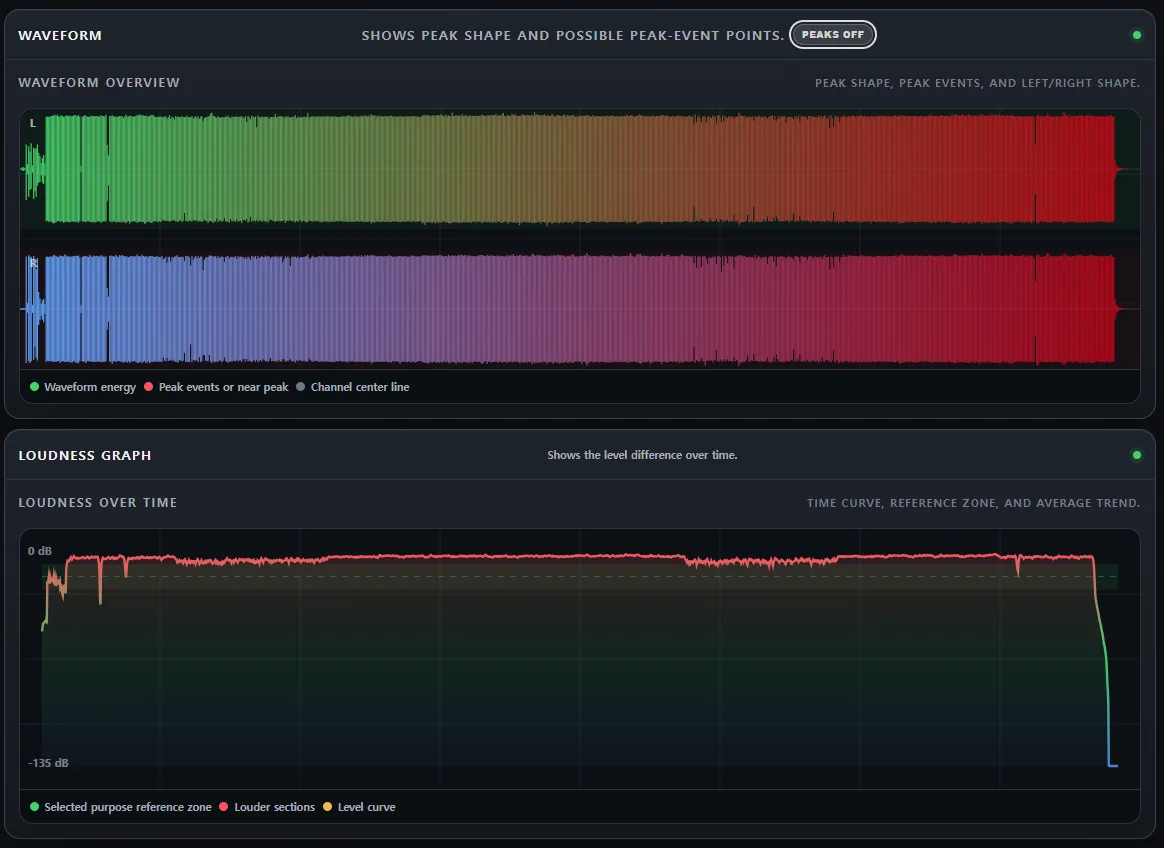
A dense waveform can remain consistently full while showing relatively little level movement over time.
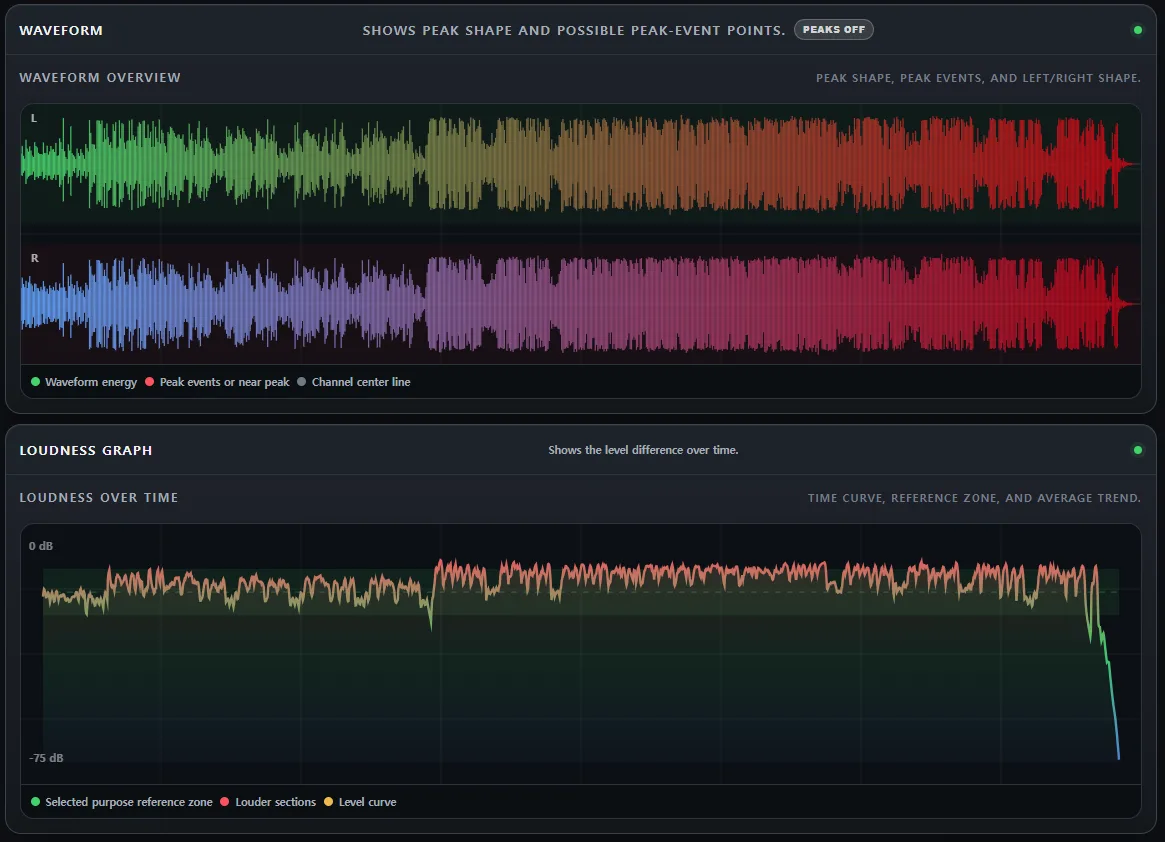
A waveform with more visible peaks and level movement can retain greater short-term contrast.
These are not before-and-after versions of the same song, and the screenshots alone do not prove that the two files have equal Integrated Loudness. They are practical examples of different mastering shapes.
The streaming conclusion appears when the files are compared at matched playback loudness. Normalization can remove the first file's level advantage, but it does not erase the structural difference between a consistently dense waveform and one with more transient movement.
The same LUFS can still feel different
Integrated LUFS is useful, but it is not a sound-quality score. Two tracks can measure the same Integrated Loudness and still differ in transient shape, tonal balance, section contrast, distortion, and peak behavior.
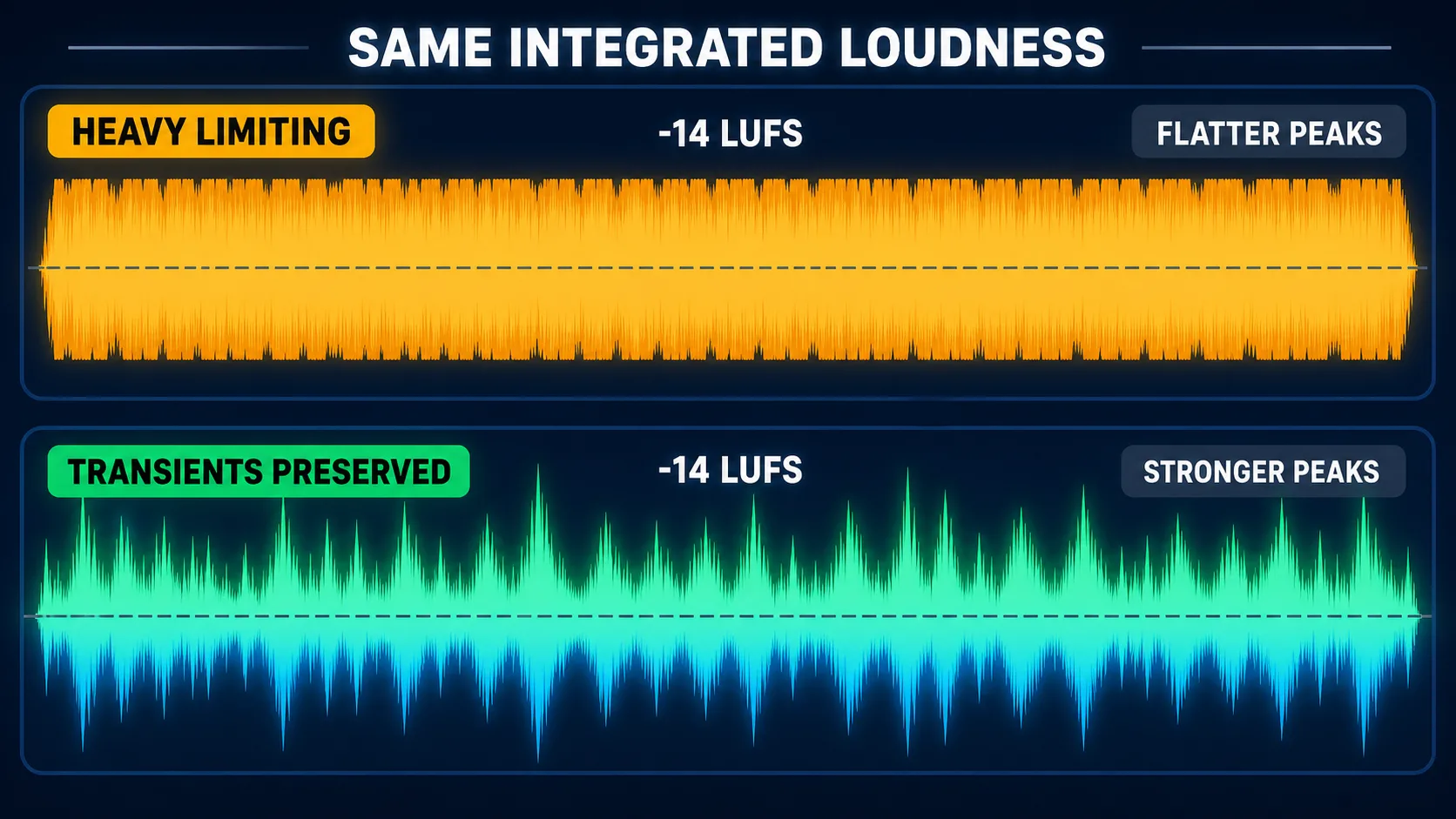
Both examples are shown at the same Integrated Loudness. Average playback level is matched, while the preserved transients rise more clearly above the body of the music.
The International Telecommunication Union defines the standard algorithms used to measure programme loudness and True Peak in ITU-R BS.1770-5.
The European Broadcasting Union also treats Programme Loudness, True Peak, Loudness Range, Momentary Loudness, and Short-term Loudness as different descriptors. Its guidance notes that useful dynamic characteristics depend on the genre, audience, and distribution platform. See EBU R 128.
This is why "master everything to -14 LUFS" is too simple. A platform target can help predict gain adjustment, but it cannot decide how dense, open, aggressive, or delicate the music should be.
Do not maximize dynamics blindly either
The opposite rule—always preserve as much dynamic range as possible—is also incomplete.
A very wide level range may lose important details in a noisy car, on public transport, or through a small playback system. Some genres rely on steady density and controlled peaks as part of their sound. Compression and limiting are creative tools, not mistakes.
The goal is not maximum dynamics. It is the right dynamics for the music.
When comparing a more limited version with a more open version, match their listening levels first. Then ask:
- Does the kick still have weight and a clear attack?
- Does the snare still create impact?
- Does the vocal become harsh or pinned in place?
- Does the chorus still feel larger than the verse?
- Did the processing improve the sound, or only make it louder?
If the denser version still serves the song after level matching, the processing may be justified. If the track becomes smaller, flatter, or more tiring, the extra loudness may not survive normalization as a useful advantage.
True Peak still matters
Integrated Loudness describes average perceived level. True Peak addresses a different risk: the highest reconstructed peak that may occur during playback or format conversion.
A PCM master can appear safe at the sample level and still produce clipping after AAC or another lossy encode. Apple specifically recommends auditioning the encoded result because a file with no visible overs in the PCM master can still clip after encoding. See the Apple Digital Masters technical brief.
Spotify currently recommends keeping a master near -14 LUFS below -1 dBTP. For masters louder than -14 LUFS, it recommends staying below -2 dBTP to reduce the chance of additional distortion during encoding. These are Spotify delivery recommendations, not universal creative targets. See Spotify's mastering tips.
EBU R 128 likewise treats Maximum True Peak as a separate technical limit and notes that different distribution systems or data-reduction rates may require a lower maximum. See EBU R 128.
Check and adjust with Audio Analyzer
SolAudioLab Audio Analyzer measures Integrated Loudness, Estimated True Peak, Peak-to-Loudness Ratio, Level Difference, waveform shape, and loudness over time directly in the browser.
On a desktop or notebook computer, the Adjust & Save Audio workflow can also create a new version from the unchanged original file.
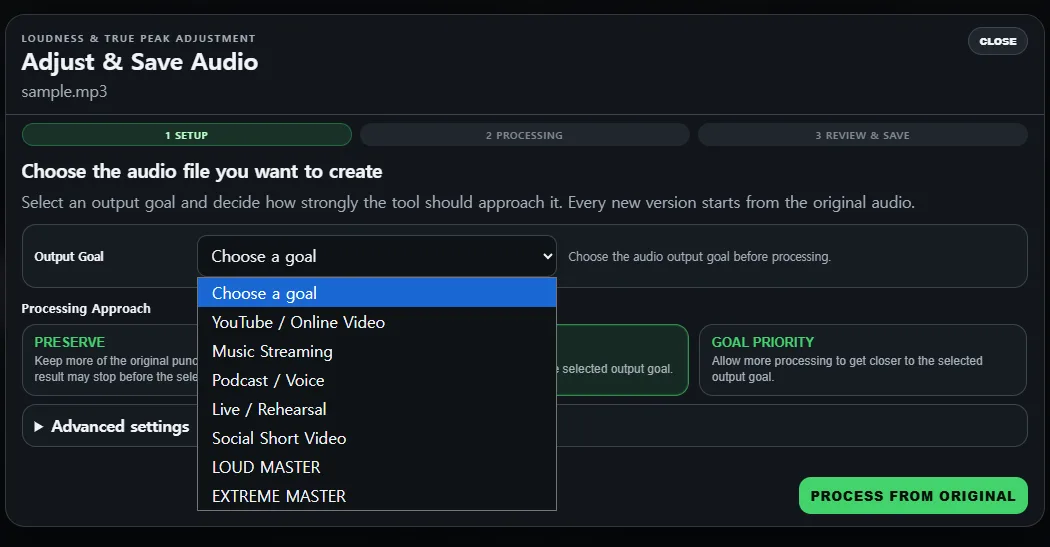
Choose an output goal and decide how strongly the tool should approach it. Every version starts from the unchanged original audio.
The Music Streaming goal starts at -14 LUFS and -1 dBTP. The three processing approaches serve different priorities:
- PRESERVE uses the least dynamics control and keeps more of the original movement.
- BALANCED balances the original sound with the selected output goal.
- GOAL PRIORITY allows more processing to approach the target.
True Peak safety has priority. If the loudness target would require more peak reduction than the selected approach allows, the result can stop below the target.
The tool does not repair clipping that already exists, and the numbers do not decide whether the result is musically better. Compare the original and adjusted versions at a similar listening level before saving.
If you want a deeper introduction to the measurement itself, read What Is LUFS? A Practical Guide to Audio Loudness. You may also find Why Does the Same Mix Sound Different at Different Volumes? useful when setting a reliable comparison level.
The practical conclusion
Loudness normalization is not a ban on loud masters. It is a playback system designed to reduce disruptive level differences between songs.
The problem begins when musical impact is sacrificed only to win a loudness comparison that normalization later removes.
A platform can turn a loud master down. It cannot restore a flattened kick attack, rebuild lost vocal movement, or make a compressed chorus expand again.
The goal is not to hit one LUFS number at any cost. It is to make a master that still carries the required punch, density, space, and movement after playback loudness is matched.
Technical References
- Spotify — Loudness normalization
Spotify's playback normalization behavior, listener settings, and mastering recommendations.
- Apple — Apple Digital Masters
Sound Check, loudness and dynamic-range discussion, encoding tests, and clipping guidance.
- ITU-R BS.1770-5 — Algorithms to measure audio programme loudness and true-peak audio level
The international recommendation defining loudness and True Peak measurement algorithms.
- EBU R 128 — Loudness normalisation and permitted maximum level
Guidance on Programme Loudness, True Peak, Loudness Range, and related loudness descriptors.
- EBU R 128 s2 — Loudness in Streaming
Streaming-specific guidance covering headroom, True Peak limiting, PLR, and dynamic adaptation.
- EBU Tech 3342 — Loudness Range
The formal definition and measurement method for Loudness Range.